Choosing the Right Microsoft Tool: A Use Case First Guide
Overview: Why this matters
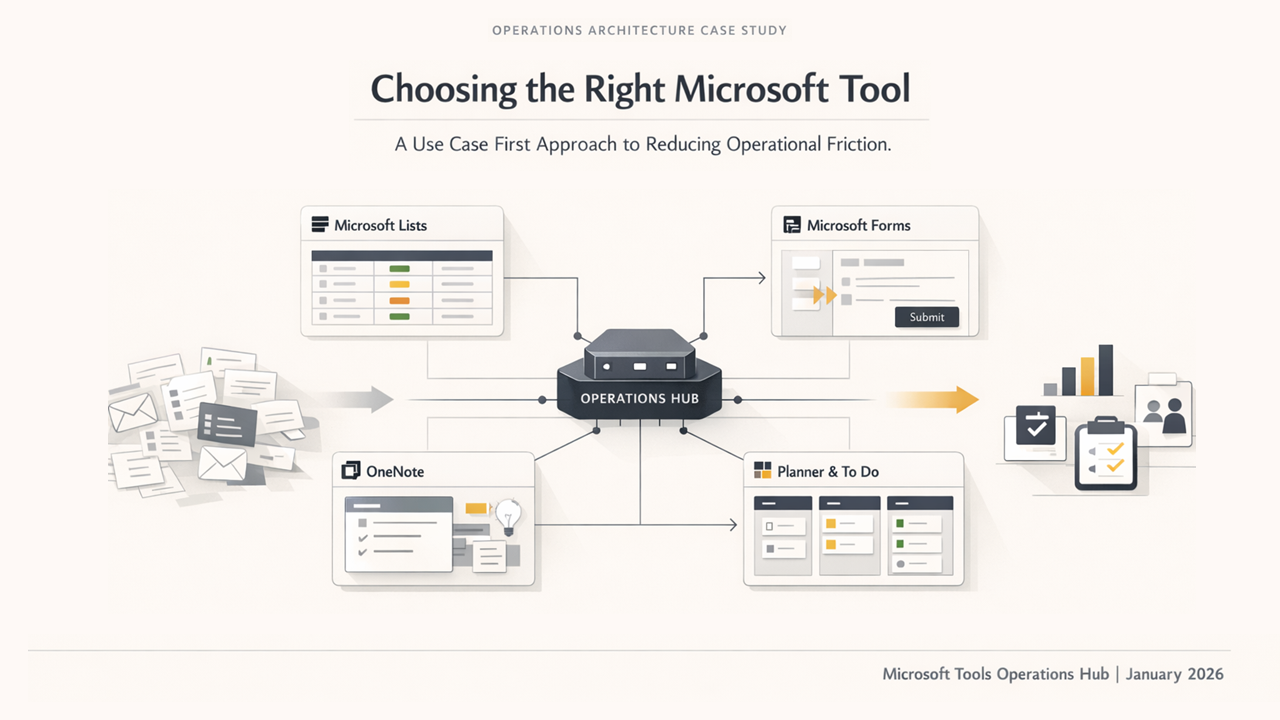
This initiative wasn't about learning every Microsoft tool technically. It was about understanding what problem each tool solves, so the organization knows which one to use—and when.
In many teams, work becomes messy not because people are unskilled, but because tools are misused: Excel files for tracking text updates, long email threads for basic status reports, and scattered Word docs with no ownership. This guide establishes a practical blueprint for team workflows.
Strategic Tool Mapping
Microsoft Lists
Microsoft Lists is like Excel—but built for shared tracking, visibility, and collaboration. If Excel is great for calculations, Lists is great for tracking work, requests, and status.
- Use Lists when: Multiple people update data, visibility matters, and you need structured tracking (Dropdowns, Dates, Approvals).
- Don't use Lists when: Heavy calculations are required.
Microsoft Forms
Think of Forms as the "Front Door" (input) and Lists as the "Control Room" (management). Forms integrates seamlessly with Lists so submissions automatically land in a structured database.
- Use Forms when: You want standardized intake from users without allowing them to edit the historic data.
- Don't use Forms when: Ongoing collaboration on a single document is required.
Microsoft OneNote
OneNote is not a document tool—it’s a knowledge and thinking tool. It's the "everything before" a final Word document.
- Use OneNote for: Meeting notes, knowledge bases, standards, personal workflows, and rapid reference material.
- Don't use OneNote for: Final reports, highly structured data tracking, or formal executive approvals.
Planner & To Do
These are lightweight task tracking tools. Use "To Do" for personal tasks and "Planner" for team task grouping via Kanban boards. For heavier structured tracking, graduate to Microsoft Lists.
Final Thoughts
You don’t need to master every technical detail. The real skill is asking: "What operational problem am I trying to solve, and which tools fits that specific boundary?" That mindset dramatically reduces administrative friction.
Leadership Feedback
He focuses on signal over noise and helps teams turn expertise into outcomes. That clarity is rare—and it's what drives better decisions and stronger results.